TurboDocx SDKs
Official client libraries for the TurboDocx API. Build document generation, digital signature, and quoting workflows in your language of choice.
Choose Your Product
All five modules ship in the same package for each language — pick the one that matches what you're building:
| Product | Use it when you need to… |
|---|---|
| TurboSign | Send documents for legally-binding e-signature; track status; download signed PDFs |
| Deliverable | Generate documents from templates with variable injection (DOCX / PPTX / PDF output) |
| TurboQuote | Build sales quotes & proposals (CPQ): line items, a product/bundle catalog, price books |
| TurboWebhooks | Receive real-time signature events instead of polling, and verify inbound deliveries |
TurboSign, Deliverable, TurboQuote, and TurboWebhooks all use the same TURBODOCX_API_KEY + TURBODOCX_ORG_ID. See credential requirements below.
Skip the boilerplate — use the TurboDocx Agent Skill to install the SDK, configure environment variables, and generate working integration code via Claude Code, GitHub Copilot, Cursor, OpenCode, Codex CLI, or Gemini CLI:
npx skills add TurboDocx/quickstart
TurboSign SDKs
Send documents for legally-binding eSignatures with full audit trails.
| Language | Package | Install Command | Links |
|---|---|---|---|
| JavaScript/TypeScript | @turbodocx/sdk | npm install @turbodocx/sdk | Docs GitHub |
| Python | turbodocx-sdk | pip install turbodocx-sdk | Docs GitHub |
| PHP | turbodocx/sdk | composer require turbodocx/sdk | Docs GitHub |
| Go | github.com/TurboDocx/SDK/packages/go-sdk | go get github.com/TurboDocx/SDK/packages/go-sdk | Docs GitHub |
| Java | com.turbodocx:turbodocx-sdk | Maven Central | Docs GitHub |
TurboWebhooks SDKs
Subscribe to all 7 TurboSign signature events — sent, viewed, recipient_signed, signed, completed, finalization_failed, voided — and verify inbound signatures with HMAC-SHA256. Each SDK exports the full set as constants, so you never hand-write the wire strings.
| Language | Package | Install Command | Links |
|---|---|---|---|
| JavaScript / TypeScript | @turbodocx/sdk | npm install @turbodocx/sdk | Docs GitHub |
| PHP | turbodocx/sdk | composer require turbodocx/sdk | Docs GitHub |
| Python | turbodocx-sdk | pip install turbodocx-sdk | Docs GitHub |
| Go | github.com/TurboDocx/SDK/packages/go-sdk | go get github.com/TurboDocx/SDK/packages/go-sdk | Docs GitHub |
| Java | com.turbodocx:turbodocx-sdk | mvn / gradle (see docs) | Docs GitHub |
For the conceptual overview (delivery retries, payload schema, dashboard configuration), see TurboSign → Webhooks.
Deliverable SDKs
Generate documents from templates with dynamic variable injection, download source files and PDFs.
| Language | Package | Install Command | Links |
|---|---|---|---|
| JavaScript/TypeScript | @turbodocx/sdk | npm install @turbodocx/sdk | Docs GitHub |
| Python | turbodocx-sdk | pip install turbodocx-sdk | Docs GitHub |
| PHP | turbodocx/sdk | composer require turbodocx/sdk | Docs GitHub |
| Go | github.com/TurboDocx/SDK/packages/go-sdk | go get github.com/TurboDocx/SDK/packages/go-sdk | Docs GitHub |
| Java | com.turbodocx:turbodocx-sdk | Maven Central | Docs GitHub |
TurboQuote SDKs
Build sales quotes and proposals programmatically: quotes and line items, a product/bundle catalog, price books, companies/contacts, and quote templates.
| Language | Package | Install Command | Links |
|---|---|---|---|
| JavaScript/TypeScript | @turbodocx/sdk | npm install @turbodocx/sdk | Docs GitHub |
| Python | turbodocx-sdk | pip install turbodocx-sdk | Docs GitHub |
| PHP | turbodocx/sdk | composer require turbodocx/sdk | Docs GitHub |
| Go | github.com/TurboDocx/SDK/packages/go-sdk | go get github.com/TurboDocx/SDK/packages/go-sdk | Docs GitHub |
| Java | com.turbodocx:turbodocx-sdk | Maven Central | Docs GitHub |
Check out our n8n community node for workflow automation, or get TurboDocx Writer for Microsoft Word.
Quick Start
Get up and running in under 2 minutes.
1. Get Your Credentials
Before you begin, you'll need two things from your TurboDocx account:
- API Access Token: Your authentication key
- Organization ID: Your unique organization identifier
TurboSign also requires a senderEmail (used as the reply-to address for signature request emails). It is a per-request body field on every signature request and the SDK throws a validation error if it is missing. It can be passed in the SDK configuration or supplied via the TURBODOCX_SENDER_EMAIL environment variable. Deliverable and TurboWebhooks do not use it at all.
TurboQuote is different: there is no senderEmail field on a quote request, but a sender is still required. It is resolved from your organization's quote template (Quote Settings). An API-key caller whose template has no sender email gets 400 SenderEmailRequired on create, duplicate, send, and handle-expired-sent — see Prepared By & Sender Identity.
Which credentials does each product need?
| Product | API key | Org ID | Also needs |
|---|---|---|---|
| TurboSign | TURBODOCX_API_KEY | TURBODOCX_ORG_ID | TURBODOCX_SENDER_EMAIL (required — reply-to for signer emails) |
| Deliverable | TURBODOCX_API_KEY | TURBODOCX_ORG_ID | — |
| TurboQuote | TURBODOCX_API_KEY | TURBODOCX_ORG_ID | a Sender Email + Sender Name on the org quote template (no per-request sender field exists) |
| TurboWebhooks | TURBODOCX_API_KEY (administrator role — non-admin keys get 403) | TURBODOCX_ORG_ID | the webhook secret returned by createWebhook, to verify inbound events |
How to Get Your Credentials
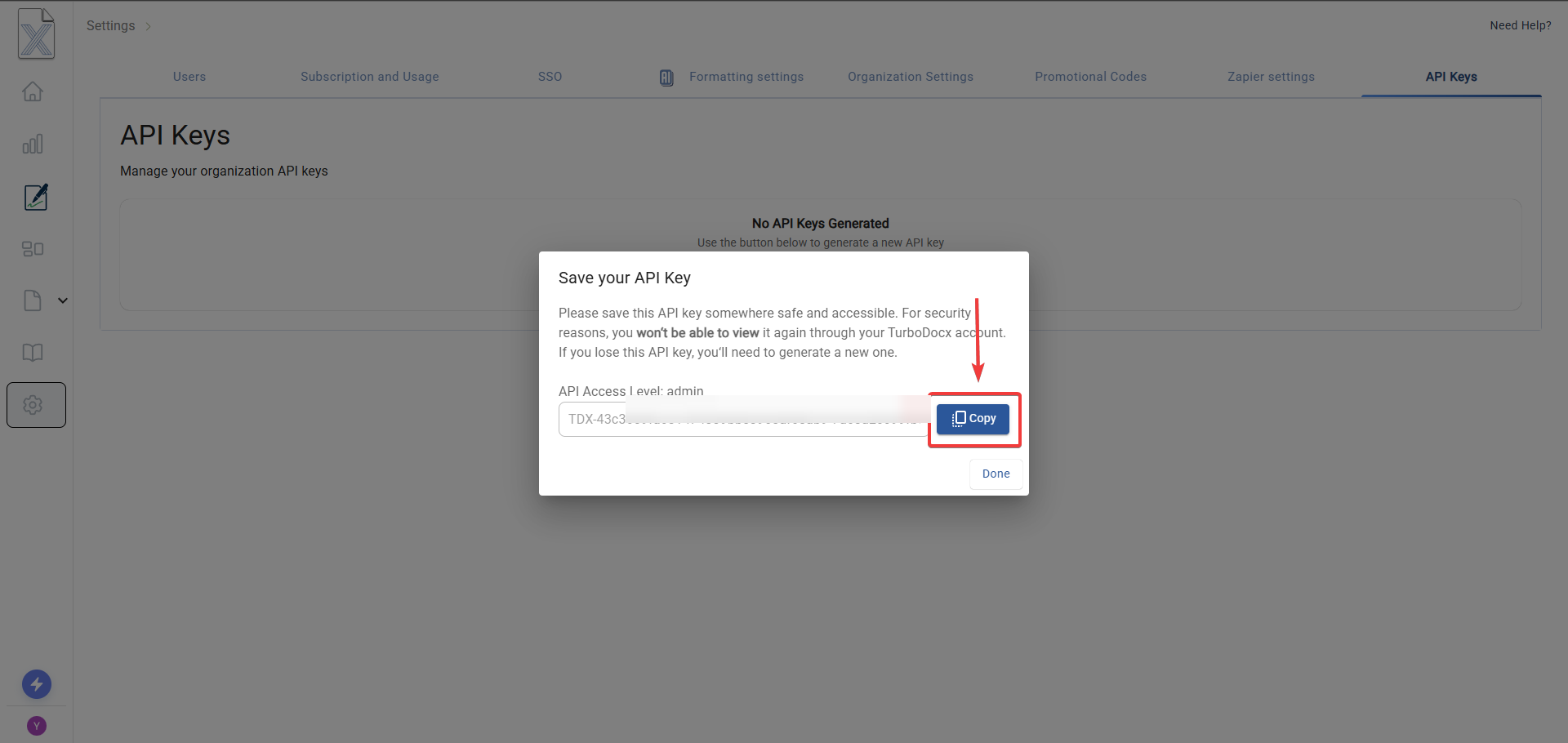
- Login to TurboDocx: Visit https://www.turbodocx.com
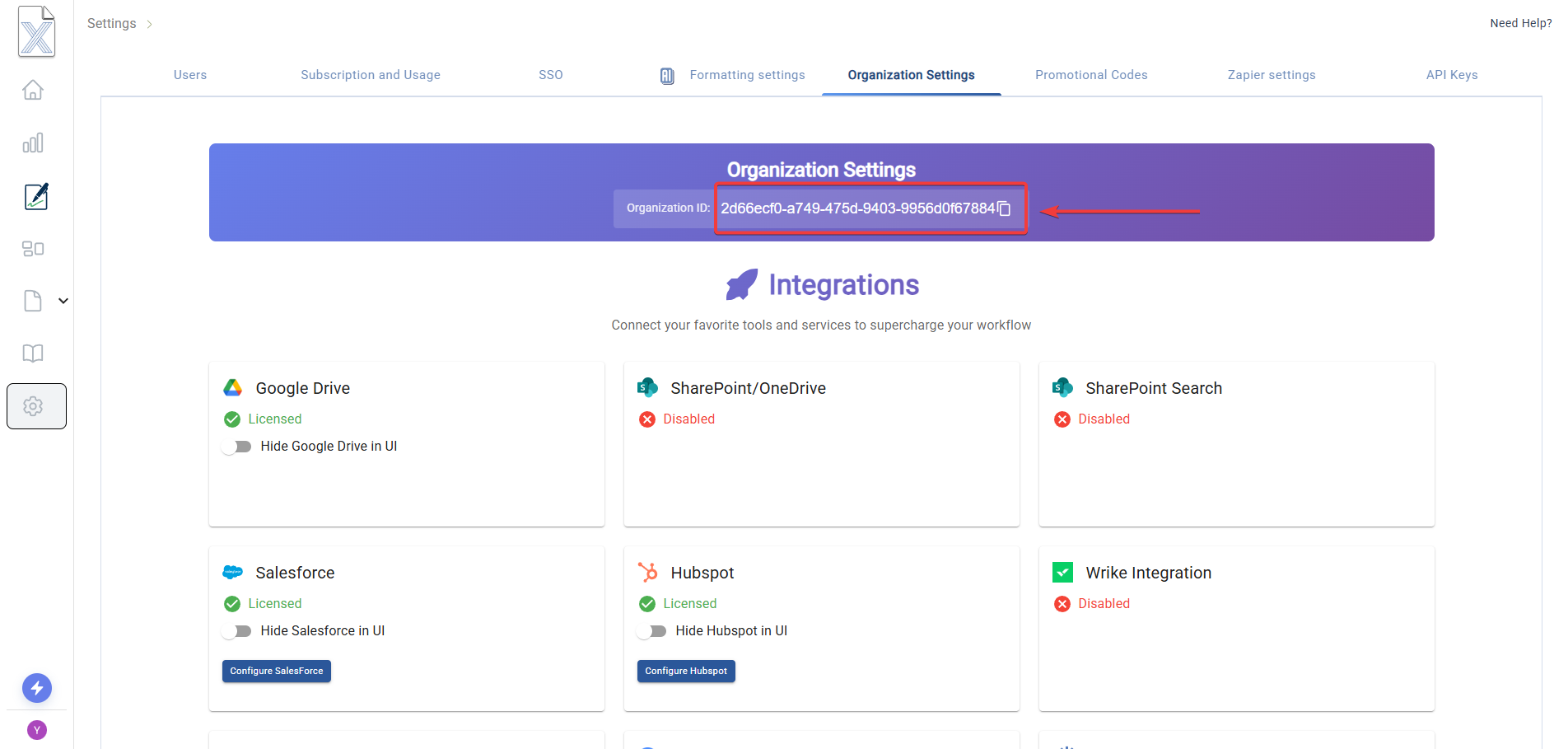
- Navigate to Settings: Access your organization settings
- API Keys Section: Generate or copy your API access token
- Organization ID: Copy your organization ID from the same settings page
- Store your API key and Organization ID as environment variables
- Never commit credentials to version control
- Rotate your API keys regularly for security
2. Install the SDK
- JavaScript
- TypeScript
- Python
- PHP
- Go
- Java
npm install @turbodocx/sdk
# or
yarn add @turbodocx/sdk
# or
pnpm add @turbodocx/sdk
npm install @turbodocx/sdk
# or
yarn add @turbodocx/sdk
# or
pnpm add @turbodocx/sdk

# TypeScript types are included in the package
pip install turbodocx-sdk
# or
poetry add turbodocx-sdk
composer require turbodocx/sdk
go get github.com/TurboDocx/SDK/packages/go-sdk
<dependency>
    <groupId>com.turbodocx</groupId>
    <artifactId>turbodocx-sdk</artifactId>
    <version>0.4.0</version>
</dependency>
3. Send Your First Document for Signature
- JavaScript
- TypeScript
- Python
- PHP
- Go
- Java
const { TurboSign } = require("@turbodocx/sdk");
// or with ES modules:
// import { TurboSign } from '@turbodocx/sdk';

// Configure with your API key
TurboSign.configure({
  apiKey: process.env.TURBODOCX_API_KEY,
  orgId: process.env.TURBODOCX_ORG_ID,
  senderEmail: process.env.TURBODOCX_SENDER_EMAIL, // required for TurboSign
});

(async () => {
  // Send a document for signature
  const result = await TurboSign.sendSignature({
    fileLink: "https://www.turbodocx.com/examples/turbodocx.pdf",
    recipients: [
      { name: "John Doe", email: "john@example.com", signingOrder: 1 },
    ],
    fields: [
      {
        type: "signature",
        page: 1,
        x: 100,
        y: 500,
        width: 200,
        height: 50,
        recipientEmail: "john@example.com",
      },
    ],
  });

  console.log(`Document sent! ID: ${result.documentId}`);
})();
import { TurboSign } from "@turbodocx/sdk";

// Configure with your API key
TurboSign.configure({
  apiKey: process.env.TURBODOCX_API_KEY || "",
  orgId: process.env.TURBODOCX_ORG_ID || "",
  senderEmail: process.env.TURBODOCX_SENDER_EMAIL || "", // required for TurboSign
});

// Send a document for signature
const result = await TurboSign.sendSignature({
  fileLink: "https://www.turbodocx.com/examples/turbodocx.pdf",
  recipients: [
    { name: "John Doe", email: "john@example.com", signingOrder: 1 },
  ],
  fields: [
    {
      type: "signature",
      page: 1,
      x: 100,
      y: 500,
      width: 200,
      height: 50,
      recipientEmail: "john@example.com",
    },
  ],
});

console.log(`Document sent! ID: ${result.documentId}`);
import asyncio
import os
from turbodocx_sdk import TurboSign

# Configure with your API key
TurboSign.configure(
    api_key=os.environ["TURBODOCX_API_KEY"],
    org_id=os.environ["TURBODOCX_ORG_ID"],
    sender_email=os.environ["TURBODOCX_SENDER_EMAIL"]  # required for TurboSign
)

async def main():
    # Send a document for signature
    result = await TurboSign.send_signature(
        file_link="https://www.turbodocx.com/examples/turbodocx.pdf",
        recipients=[
            {"name": "John Doe", "email": "john@example.com", "signingOrder": 1}
        ],
        fields=[
            {"type": "signature", "page": 1, "x": 100, "y": 500, "width": 200, "height": 50, "recipientEmail": "john@example.com"}
        ]
    )

    print(f"Document sent! ID: {result['documentId']}")

asyncio.run(main())
<?php

use TurboDocx\TurboSign;
use TurboDocx\Config\HttpClientConfig;
use TurboDocx\Types\Recipient;
use TurboDocx\Types\Field;
use TurboDocx\Types\SignatureFieldType;
use TurboDocx\Types\Requests\SendSignatureRequest;

// Configure with your API key
TurboSign::configure(new HttpClientConfig(
    apiKey: $_ENV['TURBODOCX_API_KEY'],
    orgId: $_ENV['TURBODOCX_ORG_ID'],
    senderEmail: $_ENV['TURBODOCX_SENDER_EMAIL']
));

// Send a document for signature
$result = TurboSign::sendSignature(
    new SendSignatureRequest(
        recipients: [
            new Recipient('John Doe', 'john@example.com', 1)
        ],
        fields: [
            new Field(
                type: SignatureFieldType::SIGNATURE,
                recipientEmail: 'john@example.com',
                page: 1,
                x: 100,
                y: 500,
                width: 200,
                height: 50
            )
        ],
        fileLink: 'https://www.turbodocx.com/examples/turbodocx.pdf'
    )
);

echo "Document sent! ID: {$result->documentId}\n";
package main

import (
    "context"
    "fmt"
    "log"
    "os"

    turbodocx "github.com/TurboDocx/SDK/packages/go-sdk"
)

func main() {
    // Configure with your API key
    client, err := turbodocx.NewClient(
        os.Getenv("TURBODOCX_API_KEY"),
        os.Getenv("TURBODOCX_ORG_ID"),
    )
    if err != nil {
        log.Fatal(err)
    }

    // Send a document for signature
    result, err := client.TurboSign.SendSignature(context.Background(), &turbodocx.SendSignatureRequest{
        FileLink:    "https://www.turbodocx.com/examples/turbodocx.pdf",
        SenderEmail: "contracts@acme.com", // required for TurboSign
        Recipients: []turbodocx.Recipient{
            {Name: "John Doe", Email: "john@example.com", SigningOrder: 1},
        },
        Fields: []turbodocx.Field{
            {Type: "signature", Page: 1, X: 100, Y: 500, Width: 200, Height: 50, RecipientEmail: "john@example.com"},
        },
    })
    if err != nil {
        log.Fatal(err)
    }

    fmt.Printf("Document sent! ID: %s\n", result.DocumentID)
}
import com.turbodocx.TurboDocxClient;
import com.turbodocx.models.*;

import java.util.Arrays;

public class Main {
    public static void main(String[] args) throws Exception {
        // Configure with your API key
        TurboDocxClient client = new TurboDocxClient.Builder()
            .apiKey(System.getenv("TURBODOCX_API_KEY"))
            .orgId(System.getenv("TURBODOCX_ORG_ID"))
            .senderEmail(System.getenv("TURBODOCX_SENDER_EMAIL")) // required for TurboSign
            .build();

        // Send a document for signature
        SendSignatureResponse result = client.turboSign().sendSignature(
            new SendSignatureRequest.Builder()
                .fileLink("https://www.turbodocx.com/examples/turbodocx.pdf")
                .recipients(Arrays.asList(
                    new Recipient("John Doe", "john@example.com", 1)
                ))
                .fields(Arrays.asList(
                    new Field("signature", 1, 100, 500, 200, 50, "john@example.com")
                ))
                .build()
        );

        System.out.println("Document sent! ID: " + result.getDocumentId());
    }
}
Core Features
All TurboDocx SDKs provide access to:
TurboSign — Digital Signatures
Send documents for legally-binding eSignatures with full audit trails.
| Method | Description |
|---|---|
createSignatureReviewLink() | Upload document for preview without sending emails |
sendSignature() | Upload and immediately send signature requests |
getStatus() | Check the document-level status |
getRecipients() | Per-signer status, email history, and who sent it |
download() | Download the completed signed document |
void() | Cancel/void a signature request |
resend() | Resend signature request emails |
getAuditTrail() | Get complete audit trail with all events and timestamps |
Deliverable — Document Generation
Generate documents from templates with dynamic variable injection, download source files and PDFs.
| Method | Description |
|---|---|
generateDeliverable() | Generate a document from a template with variable injection |
listDeliverables() | List deliverables with pagination, search, and filtering |
getDeliverableDetails() | Get full details of a deliverable including variables |
updateDeliverableInfo() | Update a deliverable's name, description, or tags |
deleteDeliverable() | Soft-delete a deliverable |
downloadSourceFile() | Download the original DOCX/PPTX source file |
downloadPDF() | Download the PDF version |
Learn more about Deliverable SDKs →
TurboQuote — Sales Quoting & CPQ
Build quotes and proposals: line items, a product/bundle catalog, price books, companies, and contacts.
| Method | Description |
|---|---|
createQuote() | Create a draft quote for a company and contact |
addLineItems() | Add product or bundle line items to a quote |
sendQuote() | Send a quote to the customer for review |
sendQuoteWithDeliverable() | Merge a TurboDocx Deliverable with the quote and send for e-signature |
downloadQuotePdf() | Download the rendered quote PDF |
createProduct() / createBundle() / createPriceBook() | Manage the product catalog and pricing |
createAndSend() | Create, add line items, and send in a single call |
Learn more about TurboQuote SDKs →
TurboWebhooks — Signature Events
Subscribe a per-org endpoint to TurboSign events and verify inbound deliveries with HMAC-SHA256. Requires an administrator API key.
| Method | Description |
|---|---|
createWebhook() | Subscribe the org's signature webhook (returns the secret once) |
getWebhook() | Get the webhook plus delivery stats |
updateWebhook() | Update URLs, events, or active state |
testWebhook() | Fire a synthetic delivery to all configured URLs |
regenerateWebhookSecret() | Rotate the HMAC secret |
listWebhookDeliveries() / replayWebhookDelivery() | Inspect and retry past deliveries |
verifyWebhookSignature() | Free function — verify the X-TurboDocx-Signature header on a received event |
Learn more about TurboWebhooks SDKs →
Field Positioning
TurboSign supports two methods for placing signature fields on your documents:
| Method | Best For |
|---|---|
| Coordinate-Based | PDFs with fixed layouts where you know exact pixel positions |
| Template-Based | Documents where content may shift, using text anchors like {SIGNATURE} |
For detailed information about both positioning methods, including anchor configuration, placement options, and best practices, see the Field Positioning Methods guide.
For a comprehensive list of all available field types (signature, initials, text, date, checkbox, full_name, email, title, company) and their detailed usage, see the Field Types section in the API Signatures guide.
Error Handling
All SDKs provide structured error handling with detailed error codes:
- JavaScript
- TypeScript
- Python
- PHP
- Go
- Java
const { TurboSign, TurboDocxError } = require("@turbodocx/sdk");

(async () => {
  try {
    const result = await TurboSign.sendSignature({
      /* ... */
    });
  } catch (error) {
    if (error instanceof TurboDocxError) {
      console.error(`Error ${error.code}: ${error.message}`);
      // Handle specific error codes
      if (error.code === "VALIDATION_ERROR") {
        // Handle validation error
      }
    }
  }
})();
import { TurboSign, TurboDocxError } from "@turbodocx/sdk";

try {
  const result = await TurboSign.sendSignature({
    /* ... */
  });
} catch (error) {
  if (error instanceof TurboDocxError) {
    console.error(`Error ${error.code}: ${error.message}`);
    // Handle specific error codes
    if (error.code === "VALIDATION_ERROR") {
      // Handle validation error
    }
  }
}
import asyncio
from turbodocx_sdk import TurboSign, TurboDocxError

async def main():
    try:
        result = await TurboSign.send_signature(...)
    except TurboDocxError as e:
        print(f"Error {e.code}: {e.message}")
        if e.code == "VALIDATION_ERROR":
            # Handle validation error
            pass

asyncio.run(main())
<?php

use TurboDocx\TurboSign;
use TurboDocx\Exceptions\TurboDocxException;
use TurboDocx\Exceptions\ValidationException;

try {
    $result = TurboSign::sendSignature(/* ... */);
} catch (ValidationException $e) {
    echo "Validation error: {$e->getMessage()}\n";
    // Handle validation error
} catch (TurboDocxException $e) {
    echo "Error {$e->getCode()}: {$e->getMessage()}\n";
    echo "Status code: {$e->statusCode}\n";
}
result, err := client.TurboSign.SendSignature(ctx, request)
if err != nil {
    var turboErr *sdk.TurboDocxError
    if errors.As(err, &turboErr) {
        fmt.Printf("Error %s: %s\n", turboErr.Code, turboErr.Message)
        if turboErr.Code == "VALIDATION_ERROR" {
            // Handle validation error
        }
    }
}
import com.turbodocx.sdk.TurboSign;
import com.turbodocx.sdk.TurboDocxException;
import com.turbodocx.sdk.TurboDocxException.*;

try {
    SigningResult result = turboSign.sendSignature(/* ... */);
} catch (AuthenticationException e) {
    System.err.println("Invalid API key: " + e.getMessage());
} catch (ValidationException e) {
    System.err.println("Validation error: " + e.getMessage());
    System.err.println("Error code: " + e.getCode());
} catch (RateLimitException e) {
    System.err.println("Rate limited: " + e.getMessage());
} catch (TurboDocxException e) {
    System.err.println("Error " + e.getCode() + ": " + e.getMessage());
    System.err.println("Status code: " + e.getStatusCode());
}
Common Error Codes
| Code | HTTP Status | Description |
|---|---|---|
AUTHENTICATION_ERROR | 401 | Invalid or expired API key |
AUTHORIZATION_ERROR | 403 | Authenticated, but lacks permission |
VALIDATION_ERROR | 400 | Invalid request data or parameters |
NOT_FOUND | 404 | Document or resource not found |
CONFLICT | 409 | Conflicts with the resource's state |
RATE_LIMIT_EXCEEDED | 429 | Too many requests, retry with backoff |
NETWORK_ERROR | N/A | Network connection or timeout error |
code is always populated. When the API returns a specific code the SDK surfaces it
verbatim; otherwise it falls back to the class default above, so you can branch on code
without a null check.
TurboQuote / TurboSign specific codes
These are returned by the API and passed through unchanged. They are more precise than the generic codes above — prefer them when handling a specific failure.
| Code | HTTP Status | Meaning |
|---|---|---|
SenderEmailRequired | 400 | No sender email could be resolved. TurboSign: set senderEmail on the request. TurboQuote: configure one on the org quote template (Quote Settings). |
SenderNameRequired | 400 | No sender name could be resolved — the API key has no usable name. |
QuoteHasNoLineItems | 400 | The quote has no line items. Add at least one product, bundle, or custom line item. |
QuoteExpired | 400 | The quote is past its validUntil date. Update the date before sending. |
QuoteValidUntilRequired | 400 | The quote has no validUntil date set. |
QuoteNotSendable | 400 | The quote's current status does not allow sending (only drafts can be sent). |
QuoteContactRequired | 400 | The quote's contact is missing a name or email. |
QuoteCustomerInactive | 400 | The quote's company or contact was deleted or deactivated. |
QUOTE_NOT_FOUND | 404 | No quote with that ID in this organization. |
Error messages carry the actionable reason
The API reports validation failures in several envelopes. The SDKs unwrap all of them, so
error.message is the specific field-level reason — not a generic
"There was an issue validating the body". Multiple field errors are joined with "; ":
"name" is not allowed to be empty; "companyId" must be a valid GUID
Audit Trail & Client Context
Every action you take through an SDK is recorded in the TurboDocx audit trail. All six SDKs automatically attach client-context headers to every request — including TurboSign, Deliverable, TurboQuote, TurboWebhooks, and TurboPartner — so the audit trail records real environment details instead of blanks:
| Recorded column | What the SDK sends |
|---|---|
| Device | The host machine / runtime the call came from |
| Operating system | The OS the SDK is running on |
| Timezone | The machine's IANA timezone (e.g. America/New_York) |
| Language | The machine's locale (e.g. en-US) |
| Application | TurboDocx SDK <version> |
You do not configure any of this — it is collected and sent for you.
SDK / n8n calls vs. raw API calls
The audit trail distinguishes how a request reached TurboDocx:
| Caller | How it appears in the audit trail |
|---|---|
| A language SDK | TurboDocx SDK <version>, with real device, OS, timezone, and language |
| The TurboDocx n8n node | TurboDocx n8n Node <version>, with real device, OS, timezone, and language |
| A raw HTTP/API call | The name of the HTTP library that made the call, the action API Request, and N/A for the environment fields it cannot know |
Raw API calls show N/A — not Unknown — for the fields no client context was supplied for. If
you want fully attributed audit entries, call through an SDK or the n8n node rather than hand-rolled
HTTP.
Next Steps
Support
Need help with the SDKs?
- Discord Community: Join our Discord for real-time support
- GitHub Issues: Report bugs or request features
- Documentation: Browse the language-specific guides in the sidebar