Welcome to TurboDocx
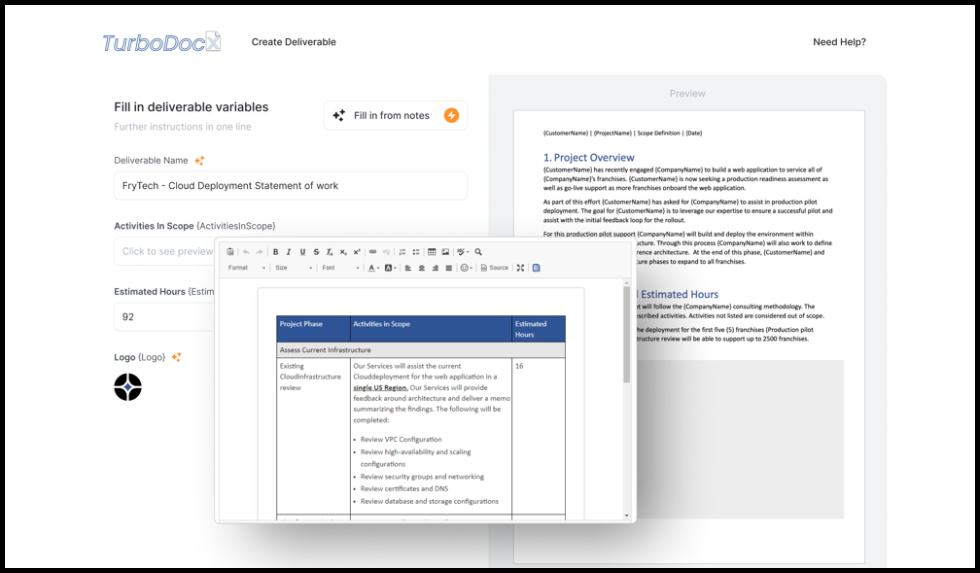
TurboDocx generates DOCX and PPTX documents from templates, collects legally binding e-signatures with TurboSign, and builds sales quotes and proposals with TurboQuote. Every product works from the TurboDocx app, a REST API, or an official SDK, so you can do this by hand or automate it from your own systems.
This page is a map of the documentation. Pick the path that matches what you're trying to do.
What you need before you start
- A TurboDocx account and access to your organization's Dashboard.
- For API or SDK work: an API key and organization ID, generated from your organization settings in the app.
- For enterprise setup (SSO, SCIM, SharePoint): admin access to your TurboDocx organization and to your identity provider.
Generate documents and presentations
TurboDocx Templating turns an existing Word or PowerPoint file into a reusable template with variables, then fills it in to produce a finished document.
- How to Create a Template: turn an existing document into a reusable template.
- How to Create a Document Template and How to Create a Presentation Template: format-specific walkthroughs for Word and PowerPoint.
- How to Create a Deliverable: generate a finished document from a template.
- Advanced Templating: loops, conditionals, and expressions for complex templates.
Get documents signed
TurboSign sends documents for e-signature, tracks who has signed, and keeps the completed audit trail.
- Setting up TurboSign: send your first document for signature.
- Managing Your Signatures: resend, remind, void, and download signed documents.
- API Signatures: send and track signature requests from your own code.
Build and send quotes
TurboQuote builds sales quotes and proposals from a product catalog, price books, and line items.
- Creating a New Quote: build your first quote.
- Adding a New Product and Bulk Importing from a Spreadsheet: populate your product catalog.
Build on the API and SDKs
Every TurboDocx product is also a REST API. Official SDKs cover JavaScript/TypeScript, Python, PHP, Go, Java, and Ruby, so most teams never call the raw API by hand.
- SDKs Overview: pick your language, install the client library, and find your API key.
- Deliverable API: the document-generation endpoints behind the Deliverable SDKs.
Connect your other tools
- Google Drive and OneDrive and SharePoint: import templates from cloud storage and export deliverables back to it.
- Salesforce, HubSpot, Zapier, Zoom, and Wrike: trigger document generation and signature workflows from the tools your team already uses.
- TurboDocx Pipelines: automate document intake, field extraction, and signing end to end.
Configure your organization
- Single Sign-On (SSO): let your organization authenticate through your own identity provider.
- SCIM Provisioning: automate user account creation, updates, and deactivation from your identity provider.
Troubleshooting
If a document, template, or integration isn't behaving as expected, check that specific product's page first, most end with their own troubleshooting section, for example Template Troubleshooting. If you can't find an answer there, contact TurboDocx support with the organization name and a description of what you tried.
Frequently asked questions
Do I need to write code to use TurboDocx? No. Templates, deliverables, quotes, and signature requests can all be created from the TurboDocx app. The API and SDKs exist for teams that want to automate the same actions from their own systems.
Which document formats does TurboDocx generate? DOCX and PPTX from templates, and PDF from TurboSign and document conversion.
Where do I find my API key and organization ID? In your organization settings inside the TurboDocx app. See "How to Get Your Credentials" in the SDKs Overview for the exact steps.
Is TurboDocx multi-tenant? Yes. Access is organized by TurboDocx organization, and enterprise features like SSO and SCIM are configured per organization.