Sender Override for Testing
The override lets you try embedded signing end to end without setting up a passcode or an identity provider. The signer goes straight to the document with no verification step.
Every signature completed this way is clearly marked as not identity-verified on the certificate of completion and in the audit trail. While the override is allowed, the settings show a persistent banner. Turn it off before you go live.
If your organization needs it in production, an admin can leave it on, but the marking still applies to every override signature.
What you'll build:
- An organization with the override switched on.
- A test document whose recipient skips verification.
- A single-use signing URL you can open or frame.
Prerequisites
- An admin account, to change the settings below.
- Enable identity verification turned on (Step 1). This switch turns on embedded signing for every mode, including the override.
- An Administrator or Contributor API key for your server.
- If you will frame the page: your origin under Allowed embedding domains (see Set up your organization).
Step 1: Turn on embedded signing and allow the override (admin)
- Go to Settings > Features and integrations > Signatures card > Configure E-Signature > Identity Verification. (Settings is in the menu under your name at the bottom of the left sidebar.)
- On the One-time passcode tab, make sure Enable identity verification is on. Without it, every signing URL request fails with
EmbeddedSigningNotEnabled, even for override recipients. - Click the Identity & embedding tab and turn on Allow identity verification override. The change saves right away, and a banner appears: "Identity verification override is enabled for this organization. Signers can be sent links that skip verification."
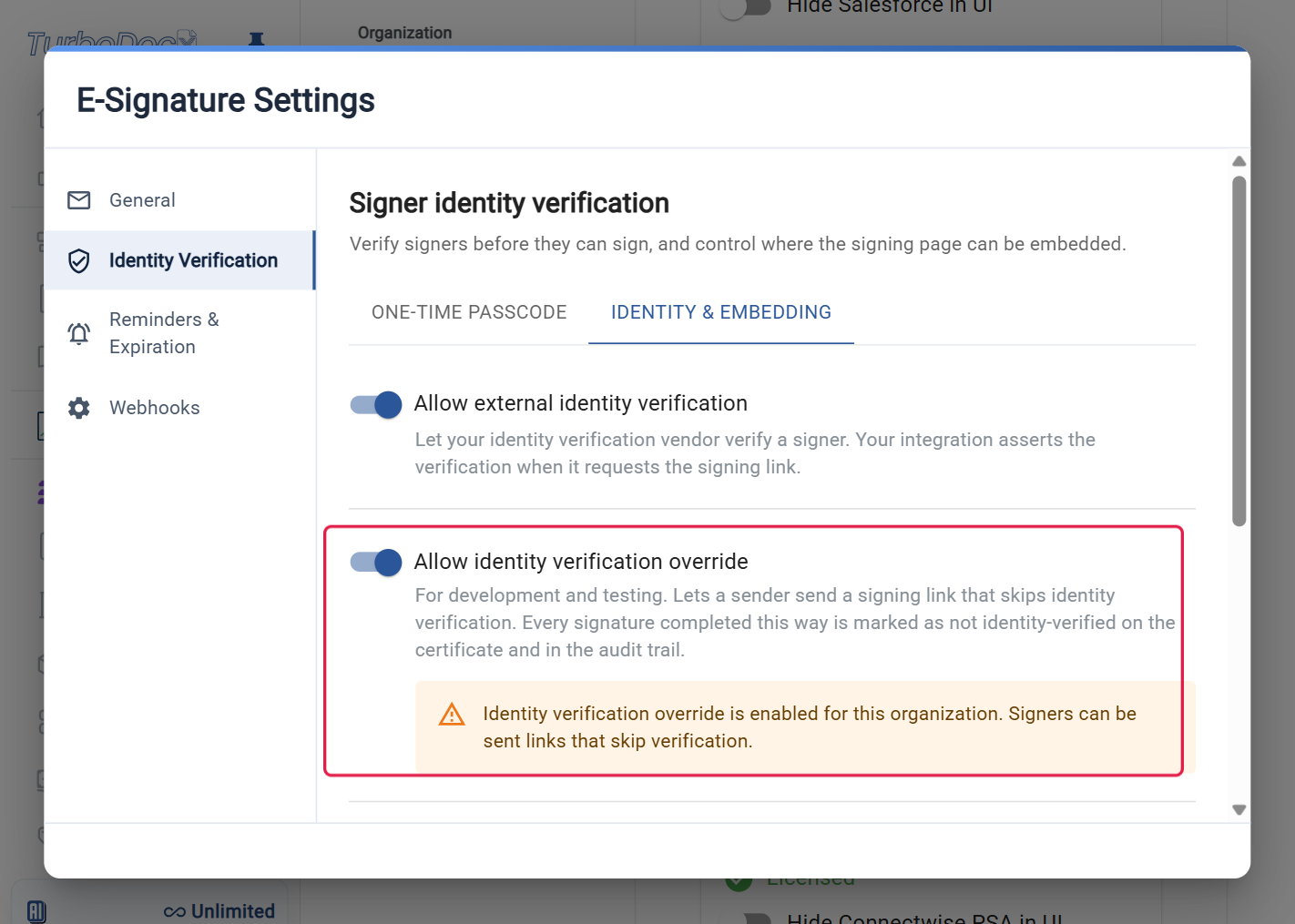
Your integration can confirm it with the organization settings: allowIdentityOverride is true.
Step 2: Send a test document with an override recipient
The one-call createEmbeddedSignature helper only sets up passcodes, so the override uses sendSignature with sendEmail: false, then createSigningUrl. The override block needs overrideIdentityVerification: true and a reason, which is recorded.
- JavaScript / TypeScript
- Python
- PHP
- Go
- Java
- Ruby
// Continues the setup from "Your own iframe": imports and TurboSign.configure(...).
const sent = await TurboSign.sendSignature({
  file: await readFile("contract.pdf"),
  fileName: "contract.pdf",
  documentName: "Override test",
  sendEmail: false,
  recipients: [
    {
      name: "Test Signer",
      email: "test.signer@example.com",
      signingOrder: 1,
      externalId: "test_123",
      identityVerification: {
        mode: "override",
        overrideIdentityVerification: true,
        reason: "Sandbox testing",
      },
    },
  ],
  fields: [
    {
      type: "signature",
      recipientEmail: "test.signer@example.com",
      template: { anchor: "{signature1}", placement: "replace", size: { width: 100, height: 30 } },
    },
  ],
});

const { url } = await TurboSign.createSigningUrl(sent.documentId, { externalId: "test_123" });
from turbodocx_sdk import TurboSign

# Inside an async function, after TurboSign.configure(...) as in "Your own iframe". pdf holds the PDF bytes.
sent = await TurboSign.send_signature(
    file=pdf,
    file_name="contract.pdf",
    document_name="Override test",
    send_email=False,
    recipients=[
        {
            "name": "Test Signer",
            "email": "test.signer@example.com",
            "signingOrder": 1,
            "externalId": "test_123",
            "identityVerification": {
                "mode": "override",
                "overrideIdentityVerification": True,
                "reason": "Sandbox testing",
            },
        }
    ],
    fields=[
        {
            "type": "signature",
            "recipientEmail": "test.signer@example.com",
            "template": {"anchor": "{signature1}", "placement": "replace", "size": {"width": 100, "height": 30}},
        }
    ],
)

link = await TurboSign.create_signing_url(sent["documentId"], external_id="test_123")
url = link["url"]
// Continues the setup from "Your own iframe": TurboSign::configure(...) and the use lines.
$sent = TurboSign::sendSignature(new SendSignatureRequest(
    recipients: [
        new Recipient(
            name: 'Test Signer',
            email: 'test.signer@example.com',
            signingOrder: 1,
            externalId: 'test_123',
            identityVerification: IdentityVerification::override('Sandbox testing'),
        ),
    ],
    fields: [
        new Field(
            type: SignatureFieldType::SIGNATURE,
            recipientEmail: 'test.signer@example.com',
            template: new TemplateConfig(
                anchor: '{signature1}',
                placement: FieldPlacement::REPLACE,
                size: ['width' => 100, 'height' => 30]
            )
        ),
    ],
    file: file_get_contents(__DIR__ . '/contract.pdf'),
    documentName: 'Override test',
    sendEmail: false
));

$link = TurboSign::createSigningUrl($sent->documentId, new CreateSigningUrlRequest(externalId: 'test_123'));
$url = $link->url;
// Inside a function that returns error, with client and ctx as in "Your own iframe". pdf holds the PDF bytes.
sendEmail := false
sent, err := client.TurboSign.SendSignature(ctx, &turbodocx.SendSignatureRequest{
	File:         pdf,
	FileName:     "contract.pdf",
	DocumentName: "Override test",
	SendEmail:    &sendEmail,
	Recipients: []turbodocx.Recipient{
		{
			Name:         "Test Signer",
			Email:        "test.signer@example.com",
			SigningOrder: 1,
			ExternalID:   "test_123",
			IdentityVerification: &turbodocx.IdentityVerification{
				Mode:                         "override",
				OverrideIdentityVerification: true,
				Reason:                       "Sandbox testing",
			},
		},
	},
	Fields: []turbodocx.Field{
		{
			Type:           "signature",
			RecipientEmail: "test.signer@example.com",
			Template: &turbodocx.TemplateAnchor{
				Anchor:    "{signature1}",
				Placement: "replace",
				Size:      &turbodocx.Size{Width: 100, Height: 30},
			},
		},
	},
})
if err != nil {
	return err
}

link, err := client.TurboSign.CreateSigningURL(ctx, sent.DocumentID, &turbodocx.CreateSigningURLRequest{ExternalID: "test_123"})
if err != nil {
	return err
}
fmt.Println(link.URL) // open, redirect to, or frame this URL
// Inside a method that throws IOException, with client as in "Your own iframe".
SendSignatureResponse sent = client.turboSign().sendSignature(
    new SendSignatureRequest.Builder()
        .file(Files.readAllBytes(Paths.get("contract.pdf")))
        .fileName("contract.pdf")
        .documentName("Override test")
        .sendEmail(false)
        .recipients(List.of(
            new Recipient.Builder()
                .name("Test Signer")
                .email("test.signer@example.com")
                .signingOrder(1)
                .externalId("test_123")
                .identityVerification(IdentityVerification.override("Sandbox testing"))
                .build()))
        .fields(List.of(
            new Field.Builder()
                .type("signature")
                .recipientEmail("test.signer@example.com")
                .template(new Field.TemplateAnchor.Builder()
                    .anchor("{signature1}")
                    .placement("replace")
                    .size(new Field.Size(100, 30))
                    .build())
                .build()))
        .build());

String url = client.turboSign().createSigningUrl(
    sent.getDocumentId(),
    new CreateSigningUrlRequest.Builder().externalId("test_123").build()).getUrl();
# Continues the setup from "Your own iframe": require "turbodocx_sdk" and configure.
sent = TurboDocxSdk::TurboSign.send_signature(
  "file"         => StringIO.new(File.binread("contract.pdf")),
  "documentName" => "Override test",
  "sendEmail"    => false,
  "recipients"   => [
    {
      "name"                 => "Test Signer",
      "email"                => "test.signer@example.com",
      "signingOrder"         => 1,
      "externalId"           => "test_123",
      "identityVerification" => {
        "mode"                         => "override",
        "overrideIdentityVerification" => true,
        "reason"                       => "Sandbox testing"
      }
    }
  ],
  "fields" => [
    {
      "type"           => "signature",
      "recipientEmail" => "test.signer@example.com",
      "template"       => { "anchor" => "{signature1}", "placement" => "replace", "size" => { "width" => 100, "height" => 30 } }
    }
  ]
)

url = TurboDocxSdk::TurboSign.create_signing_url(sent["documentId"], external_id: "test_123")["url"]
Step 3: Open the URL
The override URL is single-use and expires in about five minutes. Opening it consumes it, so request a fresh one each time.
Open it in a new tab, or frame it exactly as in the build guides: the React widget, your own iframe, or the web component. The signing page skips verification: the signer accepts the TurboSign consent terms, then the document opens.
What the signer sees
- The signing page skips verification. The signer accepts the TurboSign consent terms, and the document opens.
- The signer signs, and your page receives
turbosign:completed. - The certificate of completion and the audit trail mark the signature as not identity-verified.
Common errors
| HTTP | code | Cause | Fix |
|---|---|---|---|
| 403 | EmbeddedSigningNotEnabled | Enable identity verification is off. | Turn it on (Step 1). |
| 403 | IdentityOverrideNotAllowed | Allow identity verification override is off. | Turn it on (Step 1). |
| 400 | OverrideNotAcknowledged | The block is missing overrideIdentityVerification: true or a reason. | Send both. |
| 400 | IdentityModeConflict | The identityVerification block is invalid, for example it mixes fields from two modes. | Send only the override fields. |
| 410 | SigningUrlNotRedeemable | The single-use URL was already opened or expired. | Request a new URL. |
| 403 | none (a plain 403 Forbidden) | The API key belongs to a User. | Use an Administrator or Contributor key. |
What's next
- Next: API reference, for every field, event and error.
- Before going live, switch to a real check: Email and SMS passcode or External identity verification.