Kiosk Signing (Two Signers, One Device)
Let an agent scaffold this for you
Install the TurboDocx Quickstart Skill and let Claude Code, Cursor, Copilot, Codex, or any agent that speaks the Agent Skills standard install the SDK, wire it into your app, and write a working TurboSign integration end-to-end.
$npx skills add TurboDocx/quickstart›/turbodocx-sdk turbosign
Use this when several people sign one document, in order, on the same screen. Think of a car dealership, a clinic front desk, or a tablet at a counter.
Your server creates one document for everyone. It gets a signing URL for the first signer right away, and mints each later signer's URL only when it is their turn. Each signer verifies with their own email passcode.
What you'll build:
- A server route that creates the document for all signers in order.
- A second server route that mints the next signer's URL, with a short retry.
- A page that frames each signer in turn and moves on when one finishes.
Prerequisites
- The setup in Before you start: embedded signing on, your origin allowed, and an Administrator or Contributor API key.
- A PDF with an anchor for each signer, for example
{signature1}and{signature2}. - A working single-signer flow helps. Start with your own iframe or the React widget if you haven't built one.
Step 1: Check your setup and choose how signers verify
An admin must have completed Set up your organization: Enable identity verification is on (it is the master switch for embedded signing), and your app's origin is under Allowed embedding domains.
This guide verifies each signer with an email passcode. Every embedded signer needs a verification method unless you use the sender override while testing. To use SMS, your own identity provider, or the override, see Identity verification.
Step 2: Create the document for every signer
Give each signer a signingOrder (it defaults to their position in the list plus one). createEmbeddedSignature returns one entry per signer, in order:
status | embedUrl | What to do |
|---|---|---|
ready | Set | It is this signer's turn. Frame the URL now. |
pending | Empty | An earlier signer has not signed yet. Keep the recipientId and mint the URL later. |
completed | Empty | This signer already signed. |
Return the documentId and the list (with each recipientId) to your page.
Step 3: Mint the next signer's URL when it is their turn
When a signer finishes, the signing page sends turbosign:completed right away, but TurboSign advances the turn a moment later. A mint fired immediately can get HTTP 409 with RecipientNotInTurn or NotSignersTurn. Retry those two codes a few times with a short delay; treat every other error as real.
Both server calls, Step 2 and Step 3, in each SDK language:
- JavaScript / TypeScript
- Python
- PHP
- Go
- Java
- Ruby
import { readFile } from "node:fs/promises";
import { TurboSign } from "@turbodocx/sdk";

// Step 2: POST /api/kiosk/start
export async function startKiosk(signers: Array<{ name: string; email: string }>) {
  const { documentId, recipients } = await TurboSign.createEmbeddedSignature({
    file: await readFile("purchase-agreement.pdf"),
    fileName: "purchase-agreement.pdf",
    documentName: "Purchase Agreement",
    recipients: signers.map((s, i) => ({
      name: s.name,
      email: s.email,
      signingOrder: i + 1,
      auth: { emailOtp: true },
      fields: { signature: `{signature${i + 1}}` },
    })),
  });
  // recipients[0] is "ready" with an embedUrl; the rest are "pending".
  return { documentId, recipients };
}

// Step 3: POST /api/kiosk/next
const TURN_RACE = new Set(["RecipientNotInTurn", "NotSignersTurn"]);

export async function mintNext(documentId: string, recipientId: string): Promise<string> {
  for (let attempt = 0; ; attempt++) {
    try {
      const { url } = await TurboSign.createSigningUrl(documentId, { recipientId });
      return url;
    } catch (err: any) {
      if (!TURN_RACE.has(err?.code) || attempt >= 5) throw err;
      await new Promise((r) => setTimeout(r, 1500));
    }
  }
}
import asyncio
from turbodocx_sdk import TurboSign, ConflictError

# Step 2: POST /api/kiosk/start
async def start_kiosk(signers: list[dict]) -> dict:
    with open("purchase-agreement.pdf", "rb") as f:
        pdf = f.read()
    return await TurboSign.create_embedded_signature(
        file=pdf,
        file_name="purchase-agreement.pdf",
        document_name="Purchase Agreement",
        recipients=[
            {
                "name": s["name"],
                "email": s["email"],
                "signing_order": i + 1,
                "auth": {"email_otp": True},
                "fields": {"signature": f"{{signature{i + 1}}}"},
            }
            for i, s in enumerate(signers)
        ],
    )  # {"documentId": ..., "recipients": [...]}, first one "ready"

# Step 3: POST /api/kiosk/next
TURN_RACE = {"RecipientNotInTurn", "NotSignersTurn"}

async def mint_next(document_id: str, recipient_id: str) -> str:
    for attempt in range(6):
        try:
            link = await TurboSign.create_signing_url(document_id, recipient_id=recipient_id)
            return link["url"]
        except ConflictError as err:
            if err.code not in TURN_RACE or attempt == 5:
                raise
            await asyncio.sleep(1.5)
use TurboDocx\TurboSign;
use TurboDocx\Exceptions\ConflictException;
use TurboDocx\Types\Requests\CreateEmbeddedSignatureRequest;
use TurboDocx\Types\Requests\CreateSigningUrlRequest;
use TurboDocx\Types\Requests\EmbeddedSignatureRecipient;
use TurboDocx\Types\Requests\EmbeddedRecipientAuth;
use TurboDocx\Types\Requests\EmbeddedRecipientFields;

// Step 2: POST /api/kiosk/start
function startKiosk(array $signers)
{
    $recipients = [];
    foreach ($signers as $i => $s) {
        $recipients[] = new EmbeddedSignatureRecipient(
            name: $s['name'],
            email: $s['email'],
            signingOrder: $i + 1,
            auth: new EmbeddedRecipientAuth(emailOtp: true),
            fields: new EmbeddedRecipientFields(signature: '{signature' . ($i + 1) . '}'),
        );
    }
    // ->documentId and ->recipients; the first recipient is "ready".
    return TurboSign::createEmbeddedSignature(new CreateEmbeddedSignatureRequest(
        recipients: $recipients,
        file: file_get_contents(__DIR__ . '/purchase-agreement.pdf'),
        fileName: 'purchase-agreement.pdf',
        documentName: 'Purchase Agreement',
    ));
}

// Step 3: POST /api/kiosk/next
function mintNext(string $documentId, string $recipientId): string
{
    for ($attempt = 0; ; $attempt++) {
        try {
            $link = TurboSign::createSigningUrl($documentId, new CreateSigningUrlRequest(recipientId: $recipientId));
            return $link->url;
        } catch (ConflictException $e) {
            $race = in_array($e->errorCode, ['RecipientNotInTurn', 'NotSignersTurn'], true);
            if (!$race || $attempt >= 5) {
                throw $e;
            }
            usleep(1_500_000);
        }
    }
}
// Package setup as in "Your own iframe", plus imports: context, errors, fmt, time.
// Signer is your own struct with Name and Email fields.
// Step 2: POST /api/kiosk/start
func StartKiosk(ctx context.Context, client *turbodocx.Client, pdf []byte, signers []Signer) (*turbodocx.CreateEmbeddedSignatureResponse, error) {
	recipients := make([]turbodocx.EmbeddedSignatureRecipient, len(signers))
	for i, s := range signers {
		recipients[i] = turbodocx.EmbeddedSignatureRecipient{
			Name:         s.Name,
			Email:        s.Email,
			SigningOrder: i + 1,
			Auth:         &turbodocx.EmbeddedRecipientAuth{EmailOTP: true},
			Fields:       &turbodocx.EmbeddedRecipientFields{Signature: fmt.Sprintf("{signature%d}", i+1)},
		}
	}
	// The first recipient is "ready"; later ones are "pending" with an empty EmbedURL.
	return client.TurboSign.CreateEmbeddedSignature(ctx, &turbodocx.CreateEmbeddedSignatureRequest{
		File:         pdf,
		FileName:     "purchase-agreement.pdf",
		DocumentName: "Purchase Agreement",
		Recipients:   recipients,
	})
}

// Step 3: POST /api/kiosk/next
func MintNext(ctx context.Context, client *turbodocx.Client, documentID, recipientID string) (string, error) {
	for attempt := 0; ; attempt++ {
		link, err := client.TurboSign.CreateSigningURL(ctx, documentID, &turbodocx.CreateSigningURLRequest{RecipientID: recipientID})
		if err == nil {
			return link.URL, nil
		}
		var conflict *turbodocx.ConflictError
		race := errors.As(err, &conflict) && (conflict.Code == "RecipientNotInTurn" || conflict.Code == "NotSignersTurn")
		if !race || attempt >= 5 {
			return "", err
		}
		time.Sleep(1500 * time.Millisecond)
	}
}
// Imports: java.nio.file.*, java.util.*, com.turbodocx.TurboDocxException, com.turbodocx.models.*.
// client as in "Your own iframe"; Signer is your own record with name() and email().
// Step 2: POST /api/kiosk/start
public CreateEmbeddedSignatureResponse startKiosk(List<Signer> signers) throws Exception {
    List<EmbeddedSignatureRecipient> recipients = new ArrayList<>();
    for (int i = 0; i < signers.size(); i++) {
        recipients.add(new EmbeddedSignatureRecipient.Builder()
            .name(signers.get(i).name())
            .email(signers.get(i).email())
            .signingOrder(i + 1)
            .auth(EmbeddedRecipientAuth.emailOtp())
            .fields(new EmbeddedRecipientFields.Builder().signature("{signature" + (i + 1) + "}").build())
            .build());
    }
    // getRecipients().get(0) is "ready"; later ones are "pending".
    return client.turboSign().createEmbeddedSignature(
        new CreateEmbeddedSignatureRequest.Builder()
            .file(Files.readAllBytes(Paths.get("purchase-agreement.pdf")))
            .fileName("purchase-agreement.pdf")
            .documentName("Purchase Agreement")
            .recipients(recipients)
            .build());
}

// Step 3: POST /api/kiosk/next
public String mintNext(String documentId, String recipientId) throws Exception {
    for (int attempt = 0; ; attempt++) {
        try {
            return client.turboSign().createSigningUrl(documentId,
                new CreateSigningUrlRequest.Builder().recipientId(recipientId).build()).getUrl();
        } catch (TurboDocxException.ConflictException e) {
            boolean race = "RecipientNotInTurn".equals(e.getCode()) || "NotSignersTurn".equals(e.getCode());
            if (!race || attempt >= 5) throw e;
            Thread.sleep(1500);
        }
    }
}
# Step 2: POST /api/kiosk/start
def start_kiosk(signers)
  TurboDocxSdk::TurboSign.create_embedded_signature(
    file:         StringIO.new(File.binread("purchase-agreement.pdf")),
    fileName:     "purchase-agreement.pdf",
    documentName: "Purchase Agreement",
    recipients:   signers.each_with_index.map do |s, i|
      {
        name:         s[:name],
        email:        s[:email],
        signingOrder: i + 1,
        auth:         { emailOtp: true },
        fields:       { signature: "{signature#{i + 1}}" }
      }
    end
  ) # "documentId" and "recipients"; the first recipient is "ready"
end

# Step 3: POST /api/kiosk/next
TURN_RACE = %w[RecipientNotInTurn NotSignersTurn].freeze

def mint_next(document_id, recipient_id)
  attempts = 0
  begin
    TurboDocxSdk::TurboSign.create_signing_url(document_id, recipient_id: recipient_id)["url"]
  rescue TurboDocxSdk::ConflictError => e
    raise unless TURN_RACE.include?(e.code) && (attempts += 1) <= 5

    sleep 1.5
    retry
  end
end
Don't try to pre-mint every signer's URL. TurboSign enforces the order: a later signer's URL can't be created until it is genuinely their turn.
Step 4: Frame each signer in turn
On your page, frame the first signer's embedUrl. When turbosign:completed arrives, ask your server for the next signer's URL and frame that. This example uses the web component; the React widget works the same way with onCompleted.
<p id="who"></p>
<turbosign-form id="signing" origin="https://app.turbodocx.com" height="720"></turbosign-form>

<script type="module">
  import "https://cdn.jsdelivr.net/npm/@turbodocx/embed@0.2.1/dist/index.js"; // or import "@turbodocx/embed" with a bundler

  const form = document.getElementById("signing");
  const who = document.getElementById("who");

  const start = await fetch("/api/kiosk/start", {
    method: "POST",
    headers: { "Content-Type": "application/json" },
    body: JSON.stringify({
      signers: [
        { name: "Alex Rivera", email: "alex@example.com" },
        { name: "Sam Chen", email: "sam@example.com" },
      ],
    }),
  }).then((r) => r.json());

  const queue = start.recipients;
  let index = 0;

  function show(url) {
    who.textContent = `${queue[index].name}, it's your turn to sign.`;
    form.setAttribute("embed-url", url);
  }

  show(queue[0].embedUrl);

  form.addEventListener("turbosign:completed", async () => {
    index += 1;
    if (index >= queue.length) {
      who.textContent = "Everyone has signed. Thank you!";
      form.remove();
      return;
    }
    who.textContent = `Preparing ${queue[index].name}'s turn...`;
    const { url } = await fetch("/api/kiosk/next", {
      method: "POST",
      headers: { "Content-Type": "application/json" },
      body: JSON.stringify({ documentId: start.documentId, recipientId: queue[index].recipientId }),
    }).then((r) => r.json());
    show(url);
  });
</script>
Show whose turn it is above the signing panel, as in the example. Each signer verifies with a code sent to their own email, so the person holding the device must be able to read that inbox.
What the signers see
-
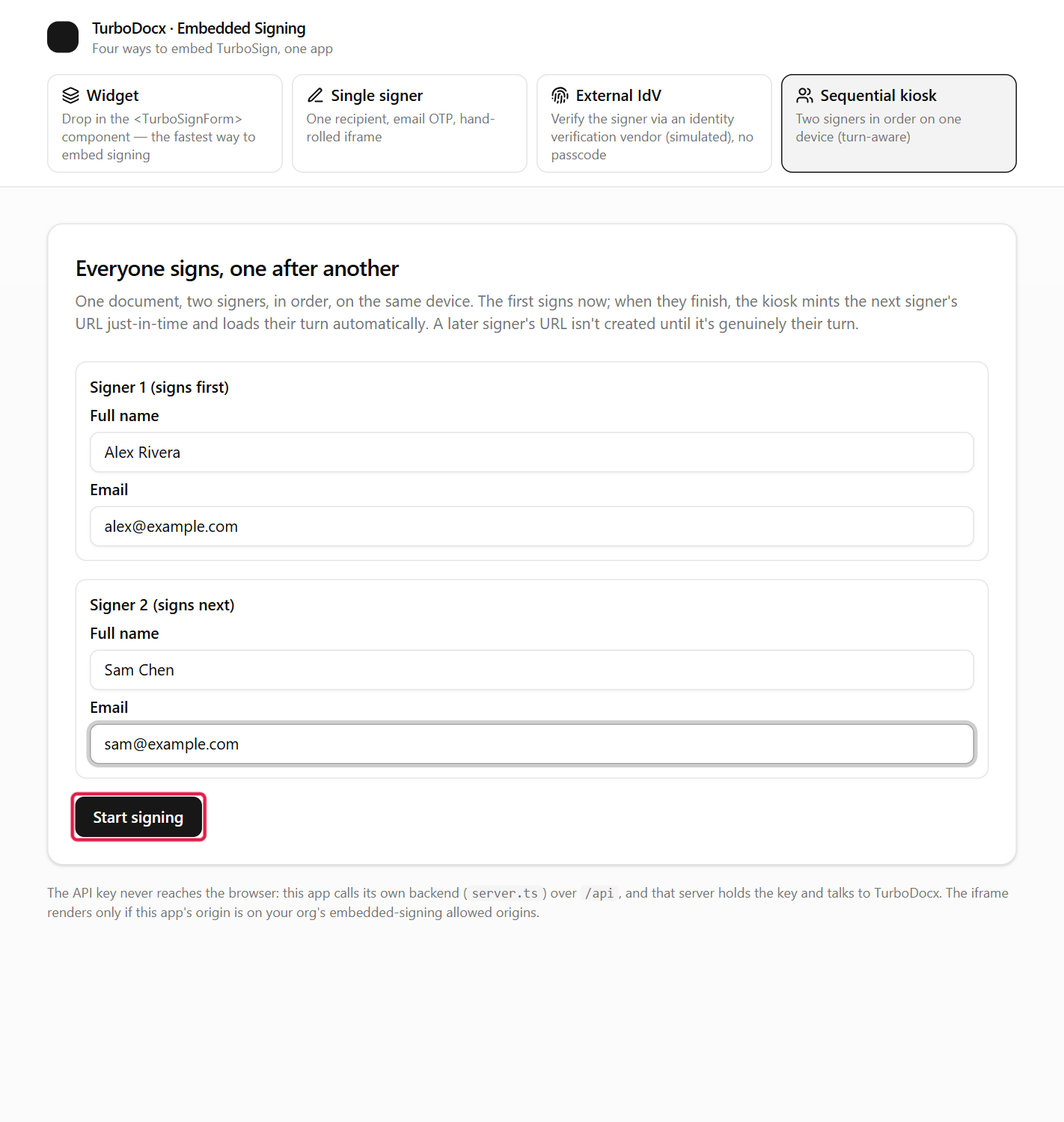
Someone enters both signers in order and clicks Start signing.
-
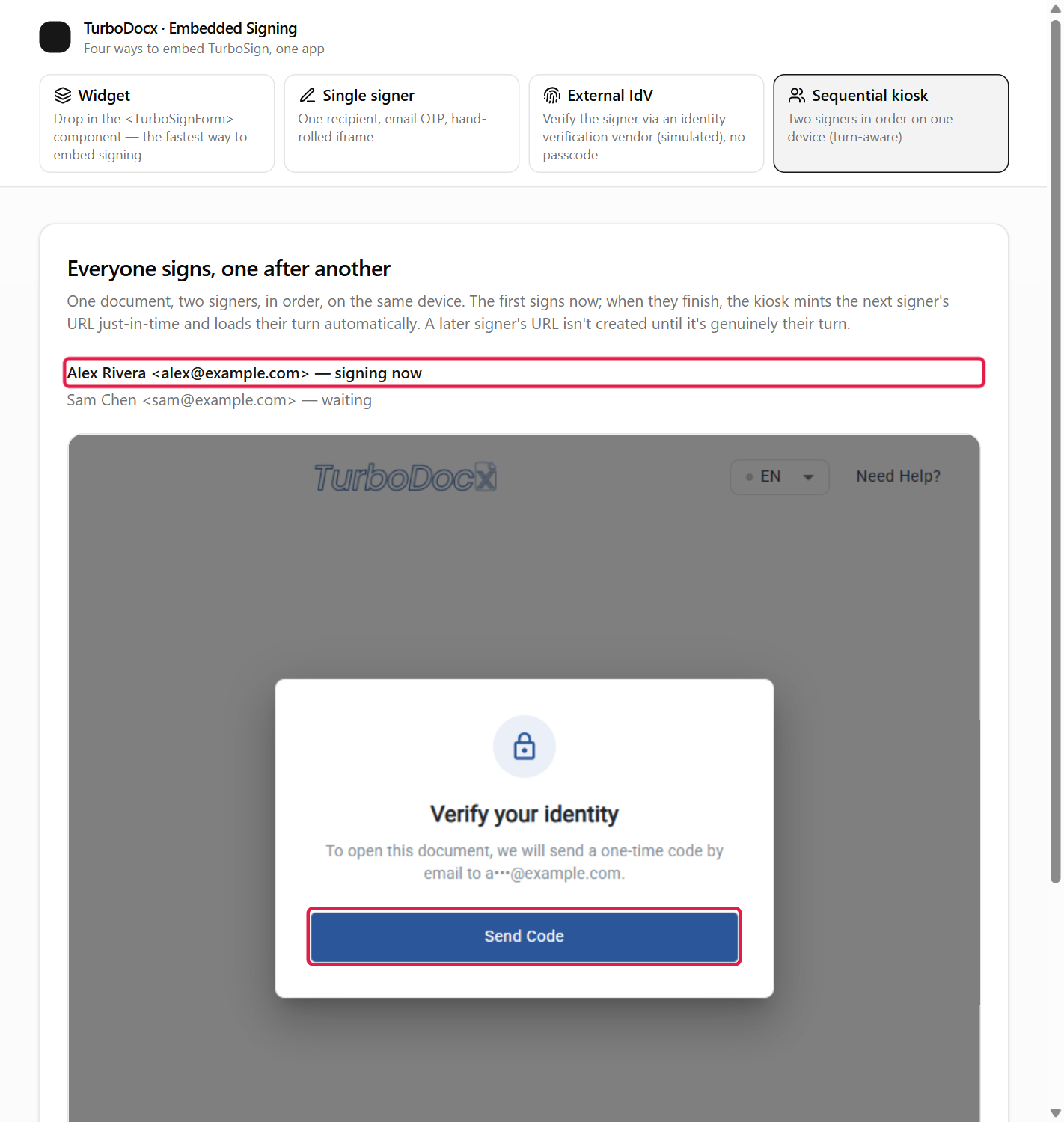
The first signer sees it is their turn, clicks Send Code, enters the code from their own email, accepts the consent, and signs.
-
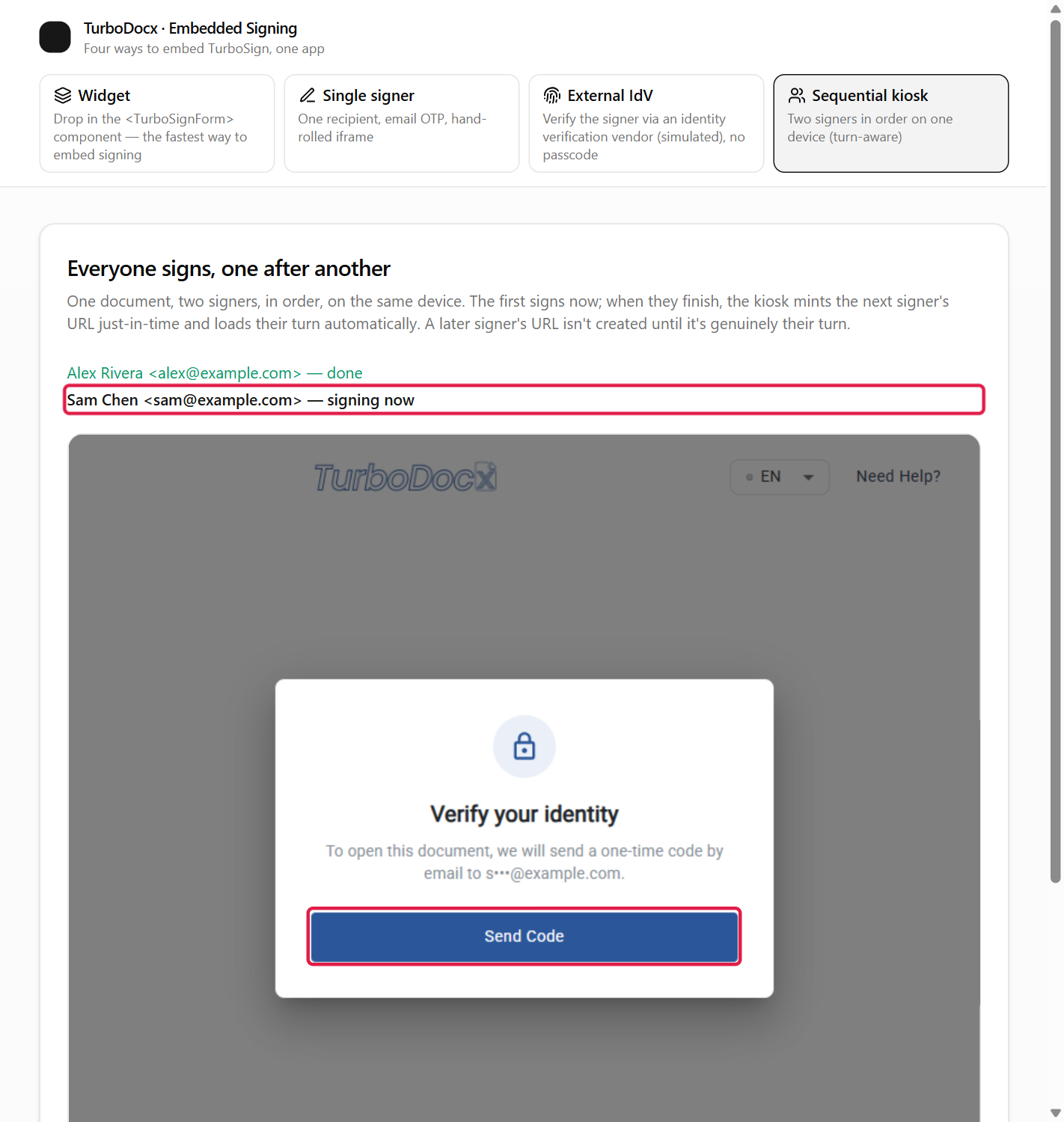
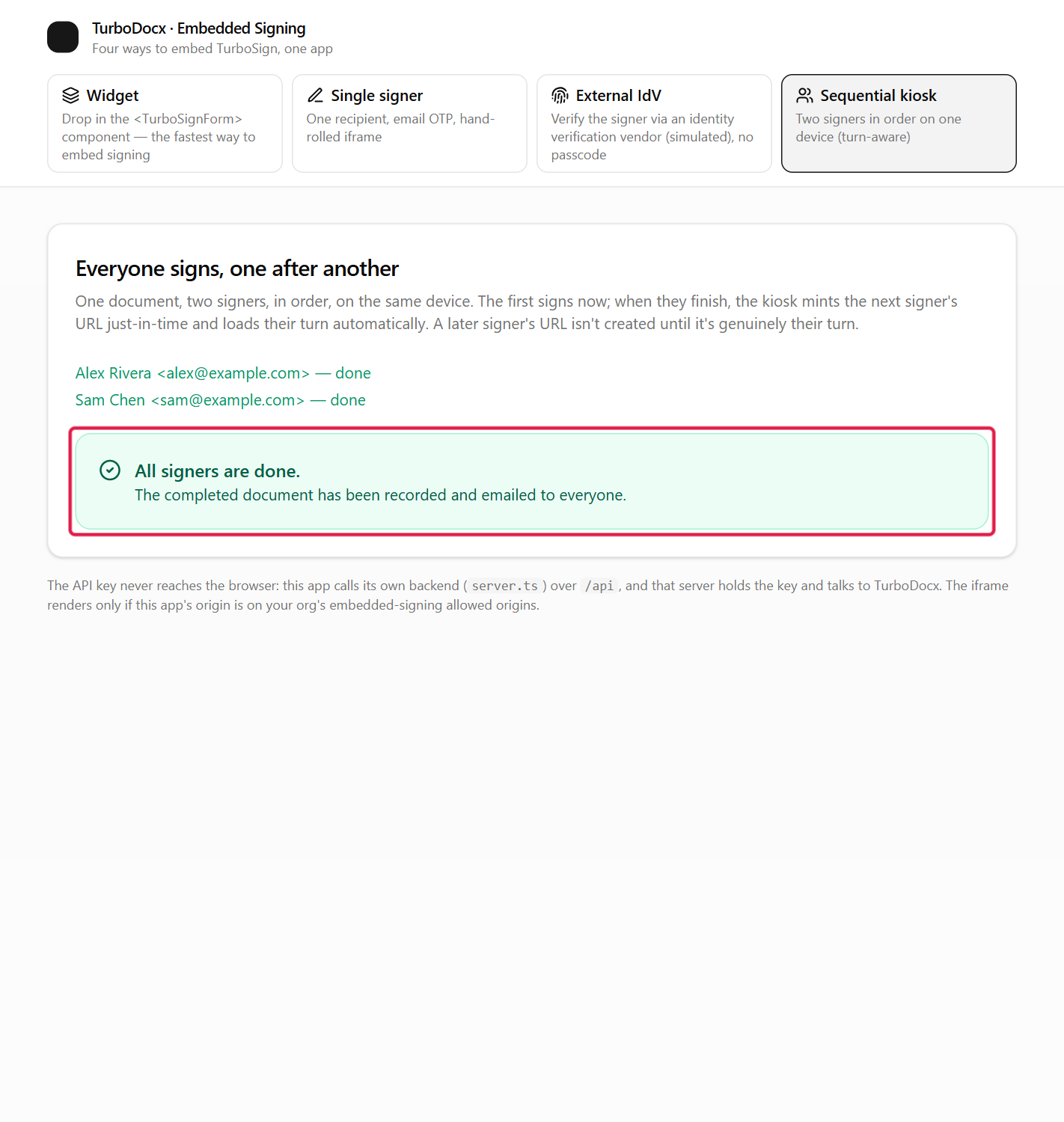
Your page shows "Preparing" for a moment, then loads the second signer's turn. The first signer is marked done.
-
The second signer verifies with their own code and signs. When the last signer finishes, TurboSign emails the completed document to everyone.
What the completion event contains
Each signer's turbosign:completed has scope: "recipient": only that signer finished. Your page uses it to move to the next signer.
For the whole document, don't rely on the last browser event. Check the document's status on your server, or wait for the completed webhook, before you treat the agreement as fully signed.
Common errors
| Symptom | Cause | Fix |
|---|---|---|
HTTP 409 RecipientNotInTurn or NotSignersTurn right after a signer finishes | TurboSign has not advanced the turn yet. | Retry for a few seconds, as in Step 3. |
HTTP 409 RecipientNotInTurn that never clears | An earlier signer has not actually signed. | Frame the earlier signer again. |
HTTP 409 RecipientAlreadySigned | That signer already signed. | Skip to the next one. |
| The second signer's panel is blank | Same as any blank frame: your origin is not allowed. | Add your origin under Allowed embedding domains. |
HTTP 403 | User-role API key, or embedded signing is off. | Use an Administrator or Contributor key, and check Step 1. |
What's next
- Next: Email and SMS passcode, to choose how signers verify.
- API reference: the
ready,pendingandcompletedstatuses in detail.